
For service businesses, invoice follow-up belongs in the same operational system as scheduling, job handoffs, and client communication: a repeatable process that reduces administrative workload and missed actions while keeping ownership visible.
Automated invoicing for service businesses should make payment easy and follow-up consistent, not presume that an overdue balance will be recovered by email. Give every invoice a clear state: sent, paid, partially paid, overdue, disputed, promised to pay, escalated, or manually owned. The state determines the action: paid suppresses reminders, partially paid pauses standard escalation for review, and overdue can trigger a courteous note with the invoice number, balance, due date, and payment link.
A weak system sends the same overdue notice on day 1, day 7, and day 14 regardless of what happened meanwhile. A controlled workflow checks the current payment status, dispute flag, account owner, and client context immediately before each send. It also separates client-facing actions, such as a reminder or payment receipt, from internal actions, such as creating a billing task or notifying the relationship owner.
That distinction creates a dependable accounts receivable routine for owners, office managers, and revenue leaders: routine invoices receive prompt, consistent follow-up; a payment received yesterday receives no reminder today; and a disputed $5,000 invoice is routed to a named person rather than an automated sequence.
Map the Payment Journey Before You Automate Anything
Begin with a one-page journey map for a single invoice. Start at service completion or the agreed billing milestone, then record the invoice issue date, delivery channel, invoice due date, payment terms, and the owner of the client relationship. Add the actual payment date for settled invoices so you can compare agreed terms with the account’s real time to pay.
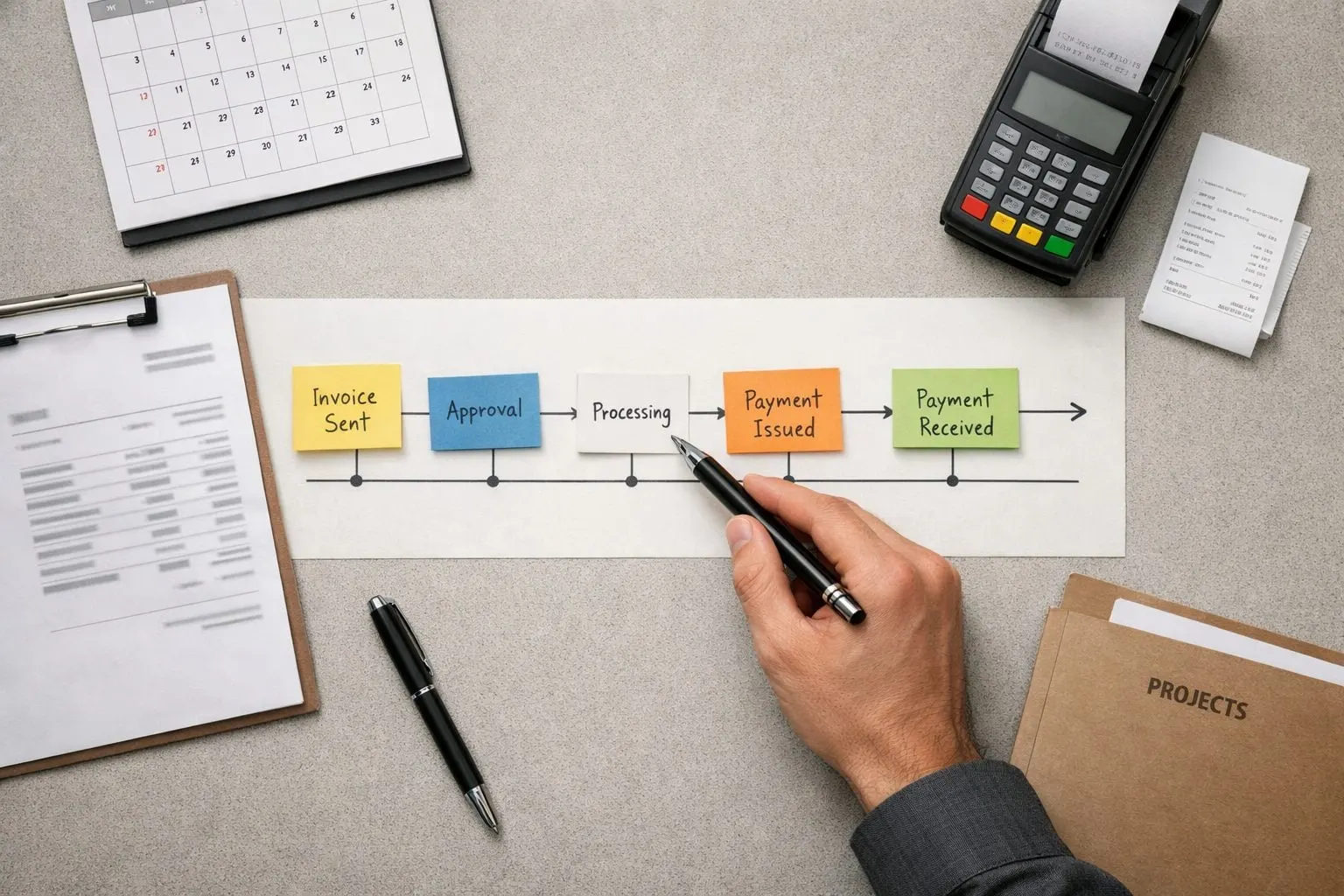
Use clear workflow states rather than a vague “open” label: ready to invoice, sent, due soon, due, grace period, overdue, escalated, and paid. The grace period is a short, deliberate buffer after the due date; it distinguishes a client who is only slightly late from an account that needs intervention. Payment confirmation must move the invoice immediately to paid, while partial payment, a promise to pay, cancellation, refund, or dispute moves it into a separate path rather than the standard reminder sequence.
Build client segmentation into that map. A new client may receive a delivery-confirmation message and a clearer payment link; a long-standing, reliable client may need less prompting. High-value invoices deserve earlier internal visibility because the cash exposure is larger, while lower-value routine invoices can follow a lighter-touch path. Also compare late-payment patterns by client type, service line, and invoice value: a retainer client, a one-off repair customer, and a complex project billing cycle should not automatically receive identical treatment.
- Active service relationship: notify the account owner before escalation so a current scheduling, renewal, or deliverable conversation is not undermined by an automated message.
- Dispute signal: pause client-facing reminders when there is an unresolved billing question, missing deliverable, credit request, or service complaint; create an internal resolution task instead.
- Late-paying pattern: apply earlier internal review or a more explicit payment request only after the account’s history supports that choice.
The completed map should show, for every state, the trigger, the client-facing action if any, the internal owner, and the stop condition. That gives the next workflow design a reliable decision model instead of a calendar that keeps sending messages after the circumstances have changed.
Connect Invoice Data to Status-Aware Workflow Triggers
Make the invoice ID the join key across your accounting software, payment portal, CRM, and workflow layer. Each record should carry the client’s billing contact, invoice number, amount and balance, issue and due dates, payment status, payment link, account owner, and an exception flag. The accounting record should hold the financial balance; the CRM adds relationship context such as an active project or named contact; the payment system supplies settlement and failure events.

Use event-based triggers rather than a single scheduled list. “Invoice sent” can start delivery tracking; “due soon” and “due today” can qualify the invoice for a reminder; and “overdue” can move it to the next collection stage. Each trigger should first test that the balance remains positive, the invoice is not cancelled or refunded, a valid contact and payment link exist, and no exception flag is present.
- Payment received: immediately mark the sequence complete, cancel queued messages, and optionally send a receipt or internal closeout notice.
- Partial payment: replace the standard reminder with an internal task or a balance-specific message; the client should not receive wording that implies nothing has been paid.
- Dispute opened: suppress client-facing collection messages and route the invoice to the account owner or billing resolver with the invoice and dispute details.
- Failed payment: create a distinct recovery path that asks the client to update payment details or use the payment link, rather than treating it as ordinary lateness.
Choose a synchronization method that matches the risk of a stale status. A payment webhook updates the workflow when the processor records an event; scheduled polling rechecks records at set intervals. Whichever method you use, run a final status check immediately before every send. That checkpoint prevents a reminder queued earlier in the day from reaching a client whose payment has since cleared.
Before automating invoice processing at scale, test duplicate event delivery, delayed payment updates, bounced emails, missing CRM matches, and a payment posted against the wrong invoice. Send those cases to an internal exception queue, not to a client-facing fallback. The practical rule is simple: uncertainty creates an owned task; only a clean, current record earns an automated message.
Design a Reminder Cadence That Is Clear, Courteous, and Escalates Gradually
Set the sequence against the contractual due date and the client’s normal expectations, then make every send conditional on the current invoice state. This adaptable reminder cadence is an operating model, not a universal schedule: a polite prompt removes friction; a collections escalation stops asking the system to solve a relationship-sensitive problem and assigns it to a person.
| Stage | Purpose, tone, and action | Suppress the message when |
|---|---|---|
| Invoice delivery | At issue, use a neutral service tone to confirm delivery. Include the invoice number, amount, due date, payment link, and a reply path if the billing contact or details need correction. | Delivery failed, the billing contact is missing, or the balance is already settled. |
| Pre-due reminder | Typically three to five days before the due date, briefly flag the upcoming payment date and provide the same direct payment option. Use this stage only where advance reminders suit the relationship. | The client has requested fewer notices, has a promised-payment status, or normally pays without prompting. |
| Due-date notice | On the due date, state plainly that payment is due and offer two paths: pay through the link or reply with the expected payment date or billing question. | Payment, partial payment, a dispute, or an active payment plan is recorded. |
| Early overdue | After a short, defined grace period, acknowledge the open balance without blame and request either payment or a specific completion date. | An account owner has an active conversation with the client. |
| Firmer follow-up | Several business days later, restate the invoice and overdue balance in direct professional language. Ask for resolution or a response, rather than adding threats or repeated generic wording. | The account is strategically sensitive or tied to an active service problem; create an internal task instead. |
| Final automated stage | Set a final response deadline, then end automated invoice reminders and notify the account owner for human review. | Any exception flag, unresolved reply, or manual ownership status exists. |
Keep variation bounded by defined controls rather than individual preference. Route higher-value invoices to owner review sooner; let reliable recurring clients skip the pre-due notice; and give new or relationship-sensitive accounts fewer automated payment reminders for clients but earlier internal visibility. The stages stay consistent, while the level of human involvement changes with account risk.
Build Exception Rules So Automation Knows When to Stop and Hand Off
An exception flag must cancel the next client-facing reminder immediately and create a visible internal task. The aim is not to “solve” an unusual balance automatically; it is to preserve the account context while giving one person a deadline to decide the next action.

| Exception | Owner and deadline | Required record and next step |
|---|---|---|
| Invoice dispute or active service failure | Account owner acknowledges within one business day; manager joins if unresolved after two. | Log the disputed amount, reason, client contact, related job or service ticket, and promised response date. Pause collection messages until the billing error, scope question, or service recovery decision is resolved. |
| Partial payment | Finance lead reviews within one business day. | Recalculate the remaining balance and record whether the payment settles a milestone, signals a shortfall, or begins an agreed arrangement. Do not treat it as either paid or ignored. |
| Payment plan or hardship request | Finance lead approves; account owner communicates the outcome by the next business day. | Record instalment amounts, dates, approval authority, and the consequence of a missed instalment. Suppress standard reminders and send only plan-specific notices. |
| Strategic account or active relationship conversation | Named account owner takes control the same business day. | Note the relationship sensitivity, current contact, and next outreach date. Automation may create internal nudges, but should not send a firmer message without owner approval. |
| Unresponsive contact or aging threshold reached | Manager reviews after the defined no-response window; finance lead decides on service hold, write-off review, or approved external collections process. | Keep a contact-attempt log, invoice history, contract reference, balance, and decision rationale. External escalation should be a deliberate approved state, never the default result of a timer. |
Set these thresholds in advance, for example, a defined number of days overdue or a set number of unanswered contacts, then make every handoff measurable: owner, due date, status, and resolution note. A task without those fields merely moves chasing from the inbox into an unowned queue.
Implement, Test, and Improve the Workflow Without Damaging Relationships
Treat launch as a controlled operating change, not a switch flipped across every account. First, load approved templates, a recognizable sender name and monitored reply mailbox, then test each merge field, payment link, and internal-task assignment. The client should see a consistent billing identity; the team should see exactly who owns any reply.
- Run payment-status suppression tests before sending live messages: mark a test invoice paid, partially paid, disputed, cancelled, and promised-to-pay, then confirm the next reminder is cancelled or routed as designed. A good result is a logged stop action; a weak result is merely the absence of an email, with no auditable reason.
- Pilot invoice collection automation with a lower-risk segment, such as routine, lower-value invoices from established clients, rather than strategic accounts or active disputes. Review every sent message and internal handoff during the first two weeks.
- Train finance, account owners, and operations staff on their distinct actions: who answers billing replies, who clears an exception, who approves a payment arrangement, and who records the final outcome. Optional AI automation for service businesses may help classify replies or draft internal summaries, but a named person should approve routing and client-facing exceptions.
Capture a baseline, then compare it weekly with post-launch results: days sales outstanding, on-time payment rate, balances in each aging bucket, payment-link conversion, and manual touches per invoice. The last measure makes labor savings visible: if staff still copy invoice details, search for owners, and send one-off chasers, the workflow has not meaningfully reduced admin labor costs.
Review the exception log weekly alongside relationship signals: client replies, complaint volume, disputes, relevant opt-outs, wrongly sent reminders, suppressed-after-payment tests, and account-owner observations. A faster payment metric paired with rising disputes or misfires is not a successful rollout. Adjust one rule at a time, such as a reminder delay, segment threshold, or handoff owner, then measure the effect before expanding the pilot.
A Simple Operating Playbook for Consistent, Client-Safe Collections
Make the workflow a short operating loop, not a collection of disconnected rules. For each invoice, record its state and segment, sync the balance and payment status from the financial record, then allow only the message or internal action assigned to that combination. A routine, lower-value invoice from an established client is the sensible first pilot segment; a disputed, strategic, or promised-to-pay account belongs in human ownership from the outset.
- Define the route: sent, approaching due, overdue, escalated, paid, or manually owned. “Manually owned” means automation stops while a named account owner resolves the relationship issue.
- Run the staged cadence only while the live balance remains due. Payment, a dispute, a partial-payment arrangement, a cancellation, or a client reply requiring judgment should suppress the next client message and create the appropriate task.
- Assign one finance or operations owner to review payment and exception metrics weekly, with account owners contributing resolution notes. Track aging movement, on-time payment, suppression failures, unanswered handoffs, and complaints.
Expand invoice follow-up automation for service businesses only after the pilot shows clean status handling and respectful client outcomes. Its value is faster, more predictable payment and fewer awkward chasers, not a guarantee that every overdue account will pay without a human conversation.
Frequently Asked Questions
How often should a service business send automated invoice reminders?
Use a staged cadence tied to the due date: invoice delivery at issue, an optional pre-due reminder 3 to 5 days before due, a due-date notice, an early overdue reminder after a defined grace period, and a firmer follow-up several business days later. End automation after the final stage and assign the account to a named owner for human review.
What should an automated overdue invoice reminder say?
Include the invoice number, current outstanding balance, due date, and a direct payment link. Use courteous, professional language that asks the client to pay or reply with an expected payment date or billing question.
How do automated invoice reminders stop after a client pays?
A payment-received event should immediately mark the invoice as paid, complete the reminder sequence, and cancel queued messages. Run a final live payment-status check immediately before every send so a recently cleared payment does not receive a reminder.
What should happen when a client disputes or partially pays an invoice?
Disputes should immediately suppress client-facing collection messages and create an internal task for the account owner or billing resolver. Partial payments require finance review within one business day, recalculation of the remaining balance, and a balance-specific follow-up instead of a standard overdue reminder.
Which invoices should receive automated follow-ups versus human escalation?
Start automation with routine, lower-value invoices from established clients that have clean payment data, valid contacts, and no exception flags. Route disputed, strategic, high-value, promised-to-pay, relationship-sensitive, or actively serviced accounts to a named owner earlier, especially once a defined aging or no-response threshold is reached.
Related resources
- Audit the customer workflow before automating it
- Customer Communication Automation for Service Businesses: The Complete Guide
- Stop Losing Home Service Leads: Automating Missed-Call Texts and Fast Follow-Up
- How Real Estate Teams Can Automate Lead Follow-Up Without Sounding Robotic
- Request a workflow review