
Treat Human Approval as a Control Layer, Not a Default Bottleneck
A human approval step is a decision gate: the AI prepares or proposes an action, but the workflow decides whether to complete it automatically, place it in a review queue, or escalate it. In human-in-the-loop automation, the objective is not to make every output wait for a manager; it is to concentrate human attention where judgment changes the outcome.
- Complete automatically: routine actions with limited downside and an easy rollback, such as tagging an inbound request, creating a draft follow-up, or assigning a job to the established service area.
- Require approval: actions that create a customer commitment, disclose sensitive information, alter financial records, or depend on a contextual exception, for example, sending a nonstandard quote or approving a refund.
- Escalate: ambiguous, conflicting, or out-of-policy cases that the assigned reviewer is not authorized to resolve.
Use model confidence as one routing signal, not a release permission. A high score reflects the model’s confidence in its own output for that task; it does not establish that the output fits a customer promise, internal policy, or the facts of an unusual case. Calibrate thresholds against actual reviewer decisions, error patterns, and the consequence of a wrong action. The next step is to identify the individual decision inside each workflow and give it a risk tier.
Step 1: Map the Decision and Assign a Risk Tier
Start by isolating the moment that changes an outcome. In a support flow, the AI may summarize a ticket, retrieve account details, and draft a reply; the approval decision is sending that reply, not reviewing the whole sequence. In finance, distinguish recommending a refund from issuing it. In contract work, distinguish extracting a clause from proposing language that changes an obligation.
Give each decision a risk tier by scoring seven practical questions: What is the impact if it is wrong? Can it be reversed cleanly? Does it use sensitive data? Could it create a contractual, policy, or jurisdiction-specific obligation? Is the case ambiguous or unusual? Will a customer see or rely on the result? Has the AI performed reliably on this exact decision when compared with reviewer outcomes?
| Tier | Decision profile | Routing outcome |
|---|---|---|
| Low | Limited impact, readily reversible, standard inputs, no sensitive disclosure, and consistently strong measured performance, for example, categorizing a request or saving a draft reply. | Complete automatically; sample a portion for review to detect drift. |
| Medium | Customer-facing or moderately costly work with clear rules but meaningful exceptions, for example, a refund recommendation within a defined range. | Route selected cases for review, including exceptions and weak evidence. |
| High | Irreversible payments, account changes, sensitive-data disclosures, nonstandard customer commitments, or contract-related outputs. | Require human approval; send unclear or out-of-policy cases to escalation. |
A confidence score can refine a tier, but never replace it: a highly confident payment change remains high risk. Record the tier, the factors that set it, and the policy, contract, or local requirement that changes the route. This gives automated business operations a decision map that can be tested and adjusted rather than a blanket review rule.
Step 2: Configure Routing Rules, Confidence Thresholds, and Exception Triggers
Translate each tier into ordered rules that a workflow can evaluate consistently. Put hard-stop exceptions first: these are conditions that override the AI’s proposed action regardless of its score. A reply that contains sensitive data, a refund that exceeds the approved amount, a record with missing required fields, or an output that conflicts with the system of record should never pass because the model appears confident.
Then add AI confidence thresholds as bands, not a single universal cutoff. For the specific task, compare past proposals with reviewer decisions and calculate both false positives (the AI passed work that should not have passed) and false negatives (the AI sent acceptable work to review) in each band. Set the automatic-completion band only where the error pattern and decision risk are acceptable; send the middle band to review; treat a very low score as an exception rather than merely another queue item.
| Inputs evaluated | Routing condition | Outcome |
|---|---|---|
| Low-risk tier; complete source record; no policy flag; established customer; high calibrated confidence | Every required condition passes | Complete automatically and retain the decision record. |
| Medium-risk tier; middle confidence band; new customer; negative sentiment; or unusually large transaction | Any review trigger is present, but no hard-stop rule applies | Send to the approval queue with the proposed action and triggering reason. |
| High-risk tier; policy violation; sensitive-data detection; missing evidence; or mismatch with source records | Any blocking or escalation trigger is present | Prevent release and route for exception handling. |
Make each rule readable as an if/then statement: if a cancellation request is from a new customer and the AI detects negative sentiment, then review it; if the requested refund is above the delegated limit or account data disagree, then block it. This structure makes an AI approval workflow testable: reviewers can see whether the route followed the rule, not just whether they liked the output.
Keep reason codes for every route, such as missing field, amount exception, or low-confidence/source mismatch. They will distinguish a threshold that needs recalibration from a business rule that should remain non-negotiable.
Step 3: Build a Review Queue That Lets Approvers Decide Quickly
A reviewer should not have to reconstruct the case from chat logs, separate systems, or the AI’s raw prompt. Each item in the review queue should arrive as a decision-ready card that makes the proposed release, the reason for review, and the safe alternatives immediately visible.
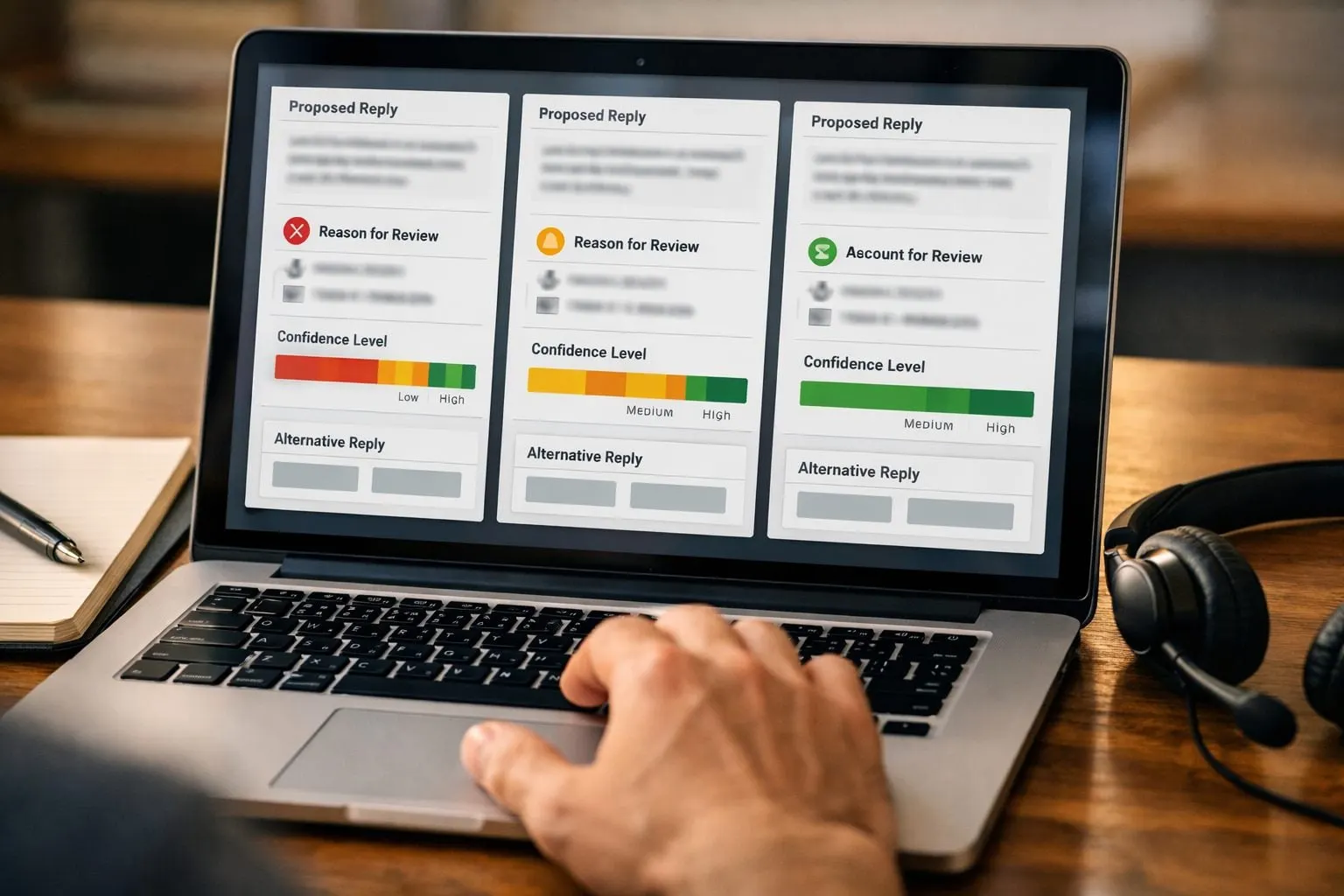
- Proposed action or output: the exact reply, refund, schedule change, record update, or other action that would be released.
- Source evidence: the relevant customer message, account record, transaction details, and links or excerpts supporting the proposal.
- Decision context: customer history, business impact, risk tier, the triggering rule and reason code, plus the task-specific confidence band.
- Applicable playbook: the policy, approved response template, service standard, or exception rule the reviewer should apply.
- Available actions: approve, reject with a structured reason, edit and approve, request information, or escalate. Do not make “approve” the only convenient choice.
Prioritize the AI approval queue by consequence and deadline, not simply arrival time. Put a customer-facing issue with a near-term response commitment ahead of an internal draft that can wait; place a high-impact exception above ordinary review work even when both entered the queue together. Display a due time and track backlog count, item aging, and time to decision so an operations lead can see whether work is waiting because demand is high, ownership is unclear, or a reviewer is unavailable.
Reviewer assignment should follow the decision, not a generic manager inbox. Route a routine service-credit request to the account owner within that person’s approved range; send a larger amount to a finance role; direct a technical diagnosis to the relevant field expert. Role-based access control supports this design by limiting each reviewer to the customer data and actions required for that role. It reduces unnecessary exposure while keeping the decision with someone who has the relevant context.
A small business can begin human-in-the-loop automation with a shared inbox, spreadsheet, or ticket queue. Use one row or ticket per decision, fixed fields for the approval card, an owner, a due time, and a recorded outcome. Dedicated workflow tooling becomes useful when assignment, reminders, permissions, or audit records become too difficult to maintain consistently by hand.
Step 4: Assign the Right Approver, Authority Limits, and Escalation Path
Put authority in a small, visible approval matrix rather than relying on job titles or an informal “ask the manager” rule. The matrix assigns a primary approver, a backup, a limit, and a response target to each decision class. Its purpose is to prevent a reviewer from approving work outside their remit while ensuring that routine exceptions do not wait for the owner.

| Decision | Who may approve | Limit and fallback |
|---|---|---|
| Standard service credit | Account owner | Within the delegated amount; otherwise finance lead |
| New customer commitment | Service or revenue lead | Within approved terms; nonstandard terms go to an executive owner |
| Sensitive-data action or high-risk exception | Named qualified owner | No delegated auto-release; escalate when evidence is incomplete or impact is unclear |
Separate duties when one person could both create and benefit from an outcome. For example, the employee requesting a vendor-payment change should not be its sole approver; a different authorized role reviews the evidence and releases it. Name at least one backup for every primary approver, with the same access and authority limits, so absence does not become an untracked workaround.
Set a service-level agreement for each lane: a response target, an overdue threshold, and the next owner. A low-risk customer reply might move to its backup after one business hour; a high-impact item can alert its escalation owner immediately. Your AI escalation workflow should also escalate, not merely remind, when reviewers disagree, required evidence is missing, the item exceeds a delegated limit, or a high-risk action remains unresolved.
Record the escalation path in order: primary approver, backup, functional lead, and final accountable owner. Each handoff should preserve the proposed action, evidence, prior decisions, timestamps, and reason code. Legal-adjacent work needs a narrower route: send it to the qualified internal owner or counsel designated by the organization, with requirements tailored to the relevant jurisdiction, contracts, and internal policy, not to a general operations approver.
Step 5: Define What Happens After Approval, Rejection, or Escalation
A decision button is not the end of the workflow; it must trigger a defined state change. Use a simple state flow: pending review → approved, rejected, or escalated. An approved item moves to executed only after the workflow verifies that the reviewer had authority and that the approved version is still current. Once the downstream action succeeds, mark the item closed.
Approval should release only the action the person saw. Store a version ID or immutable snapshot of the AI draft, source data, amount, recipient, and policy context. If a customer record, price, or proposed message changes after approval, return the item to pending review rather than treating the earlier decision as permission for the revised action. For irreversible actions, sending a payment, publishing external content, changing a contract term, or deleting a record, add a final pre-execution checkpoint that compares the approved snapshot with the live payload.
Rejection needs a structured rejection reason, not a free-text “no.” Require a code and allow a short note. Useful codes include incorrect facts, missing evidence, outside delegated limit, policy conflict, wrong customer intent, and manual handling required. A correctable rejection moves to revised, where the AI or operator prepares a new version for review. A non-correctable rejection takes the fallback path to a named manual process and must not re-enter automatic execution.
Escalation pauses all release actions until the higher-authority owner records an approve, reject, or alternative decision. Notify the assigned owner, prior reviewer, and workflow owner when an item changes state; overdue escalations should also notify the designated backup.
Make the approval log append-only. For every transition, capture the item ID, state, proposed and approved version, reviewer identity and authority, timestamp, decision and reason code, supporting evidence links, downstream execution result, and any escalation recipient. This record lets the team trace one outcome end to end and later distinguish recurring AI defects from policy exceptions.
Step 6: Pilot the Workflow and Calibrate Its Rules Before Expanding
Begin with one narrow decision class, such as routine appointment-confirmation replies, and run it in draft mode before it can act. In draft mode, reviewers approve, edit, or reject the proposed outcome; in shadow mode, the existing manual process remains authoritative while the AI records what it would have done. Draft mode tests usability, while shadow mode exposes disagreement without changing customer-facing work.

Compare each proposal with the reviewer’s final decision. Track agreement, edits, rejection reasons, missed exceptions, and false positives, cases the workflow allowed through when it should have routed for review. Change one input at a time: a threshold, an exception rule, retrieval source, or prompt version. Treat a prompt, model, or system-data change as a new version and repeat the comparison rather than assuming prior results still apply.
Before enabling automatic completion, sample low-risk releases at a fixed cadence and include deliberately difficult cases: incomplete records, conflicting account data, unusual wording, repeat customers, and boundary amounts. Set rollback criteria in advance: if sampled errors, reviewer disagreement, or a defined rejection reason rises beyond the team’s accepted limit, disable auto-release for that route and send every item to the manual queue. Expand only after the pilot shows that the rules, not merely the model score, reliably send exceptions to people.
Step 7: Measure Whether Human Review Is Improving the Workflow
Use one dashboard for each workflow version and risk tier. Track automation rate (completed without review), approval rate, rejection rate by reason, escalation rate, SLA compliance, reviewer turnaround time, post-execution errors, customer complaints or rework, and audit completeness.
Read the measures together. A rising automation rate is progress only if low-risk post-execution errors and customer impact stay flat or improve. High rejection for missing facts points to source-data fixes; inconsistent decisions by reviewer point to coaching or clearer policy; growing low-confidence reviews may justify recalibrating thresholds. Missed SLAs indicate queue capacity or escalation ownership problems, not necessarily an AI problem.
Review trends by risk tier, reviewer, rejection reason, and workflow version. Record every decision to widen, narrow, or pause automation and the metric that justified it. This turns human oversight for AI automation into a targeted control: automate more of a proven low-risk route, while tightening or redesigning routes that create avoidable errors.
Frequently Asked Questions
What is human-in-the-loop automation?
Human-in-the-loop automation uses AI to prepare or propose actions, then routes each decision to automatic completion, human review, or escalation based on risk and rules. Human approval is a control layer for decisions where judgment can change the outcome, not a requirement for every AI output.
When should an AI workflow require human approval?
Require approval for actions that create customer commitments, disclose sensitive data, alter financial records, involve contract-related outputs, or cannot be cleanly reversed. High-confidence AI outputs still require review when the decision is high risk, such as a payment change or nonstandard quote.
How do you set confidence thresholds for AI automation?
Set task-specific confidence bands by comparing past AI proposals with reviewer decisions and measuring false positives and false negatives in each band. Use hard-stop rules first for sensitive data, missing fields, policy violations, amount limits, and source-record mismatches, regardless of confidence.
What information should an AI approval queue include?
Each review item should show the exact proposed action, supporting source evidence, customer and risk context, triggering rule, reason code, confidence band, and applicable policy. Reviewers need actions to approve, reject with a structured reason, edit and approve, request information, or escalate.
How do you decide whether an AI workflow can move from review to automatic completion?
Start with one narrow decision class in draft or shadow mode, then track agreement, edits, rejection reasons, missed exceptions, and false positives. Enable auto-completion only for proven low-risk routes, sample releases at a fixed cadence, and disable auto-release if errors or reviewer disagreement exceed the accepted limit.